Trace the source
From port to process to the IDE or terminal that started it. Know what it is, and where it came from.
 Port Guardian
See the process behind every port. Get back to the code that matters.
macOS · Windows / Free & open source
A demo only. No access to local processes.
Local ports, organized by project. Processes, origins, and risks at a glance.
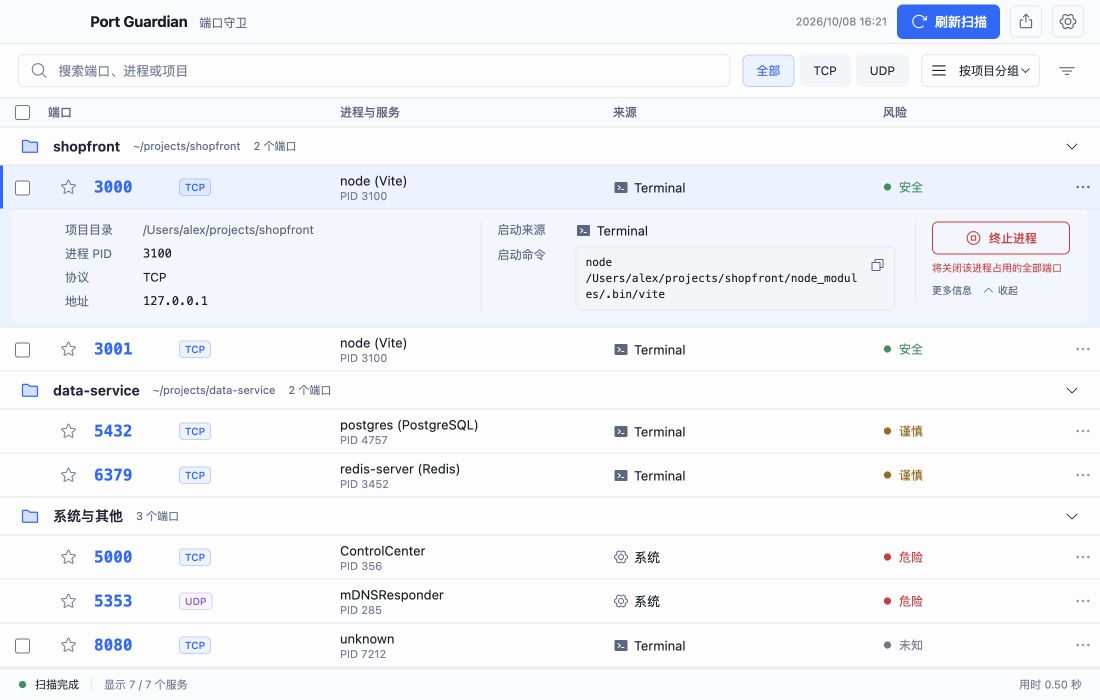
From port to process to the IDE or terminal that started it. Know what it is, and where it came from.
Group by working directory and search TCP / UDP ports. Keep parallel projects in order.
Check process identity and risk before stopping it. System services are protected; graceful or forced termination is your choice.
One focused little tool. More room for your flow.
The current macOS build is not Apple Developer ID signed or notarized. Windows may also display a SmartScreen notice.
macOS: Drag the app to Applications. If the first launch is blocked, go to System Settings → Privacy & Security, verify the source, and select Open Anyway.
Windows: If SmartScreen appears, verify that the installer came from this project’s GitHub Releases, then select More info → Run anyway.
Read the full installation guide